Skills Stack, MCP, and Project Context
- EN
- PT
Table of Contents
Author’s Note: This guide consolidates best practices for prompt engineering and autonomous systems architecture. It is designed for developers who want to move beyond simple “prompts” toward robust and reliable agentic systems.
#
0. Quick Setup (TL;DR)
Want to get started right now? Here’s how to configure Skills support in common agentic environments.
| Platform | How to Configure |
|---|---|
| Codex | Keep skills in skills/ in your workspace and project rules in AGENTS.md. The agent uses these artifacts as its primary source of operational context. |
| Claude | Create a .claude/skills/ folder at the project root (or ~/.claude/skills/ for personal use). Claude Code auto-discovers skills on startup: no additional configuration needed. |
| OpenCode | Skills are loaded automatically if placed at the project root under .opencode/skills or skills/. Make sure the Agent plugin is active. |
To manage skills across multiple agents from a single source, skills.sh (Vercel Labs) installs to a central folder and propagates via symlinks: npx skills add <repo>.
Interoperability: The Agent Skills standard is adopted by 30+ tools: Claude Code, Codex, Cursor, VS Code, Gemini CLI, GitHub Copilot, Roo Code, OpenCode, and others. A single Skill works across any compatible runtime. Don’t create per-tool versions; the file system is the universal source of truth. See the full list at agentskills.io.
#
1. The New Frontier: Agentic Engineering
The era of using LLMs purely as consultative chatbots is over. We are living through the transition to Autonomous Agents: systems capable of orchestrating planning, tool execution, and result verification. However, an agent’s effectiveness is directly proportional to the quality of the tools (Skills) provided to it.
Unlike a standalone prompt, a Skill is a modular, reusable, and deterministic functional unit that extends the model’s native capabilities.
##
The Skills Architecture Pattern
To guarantee interoperability across the dozens of platforms that support the Agent Skills standard, we adopt an architecture based on Context Isolation and Safe Execution.
This solves the “Functional Hallucination” problem: research from Anthropic and DeepMind indicates that models “grounded” in well-defined tools make significantly fewer logical errors.
##
The Agentic Stack
To build truly effective agents that understand your organization’s context, we use three complementary patterns aligned with the Agentic AI Foundation ecosystem:
- MCP (Model Context Protocol): The Data Access layer. Answers “What tools and data can I access?” (e.g., connecting to Postgres or Jira).
- Agent Skills: The Know-How layer. Answers “How should I perform this task?” (e.g., the company’s Code Review methodology).
- AGENTS.md: The Project Context layer. Answers “What are the rules for this specific project?” (e.g., use React with Tailwind).
#
2. Technical Architecture of a Skill
To build a robust skill, we abandon organic structures in favor of strict organization. It’s not just about folders: it’s about Progressive Disclosure.
##
The “Progressive Disclosure” Pattern
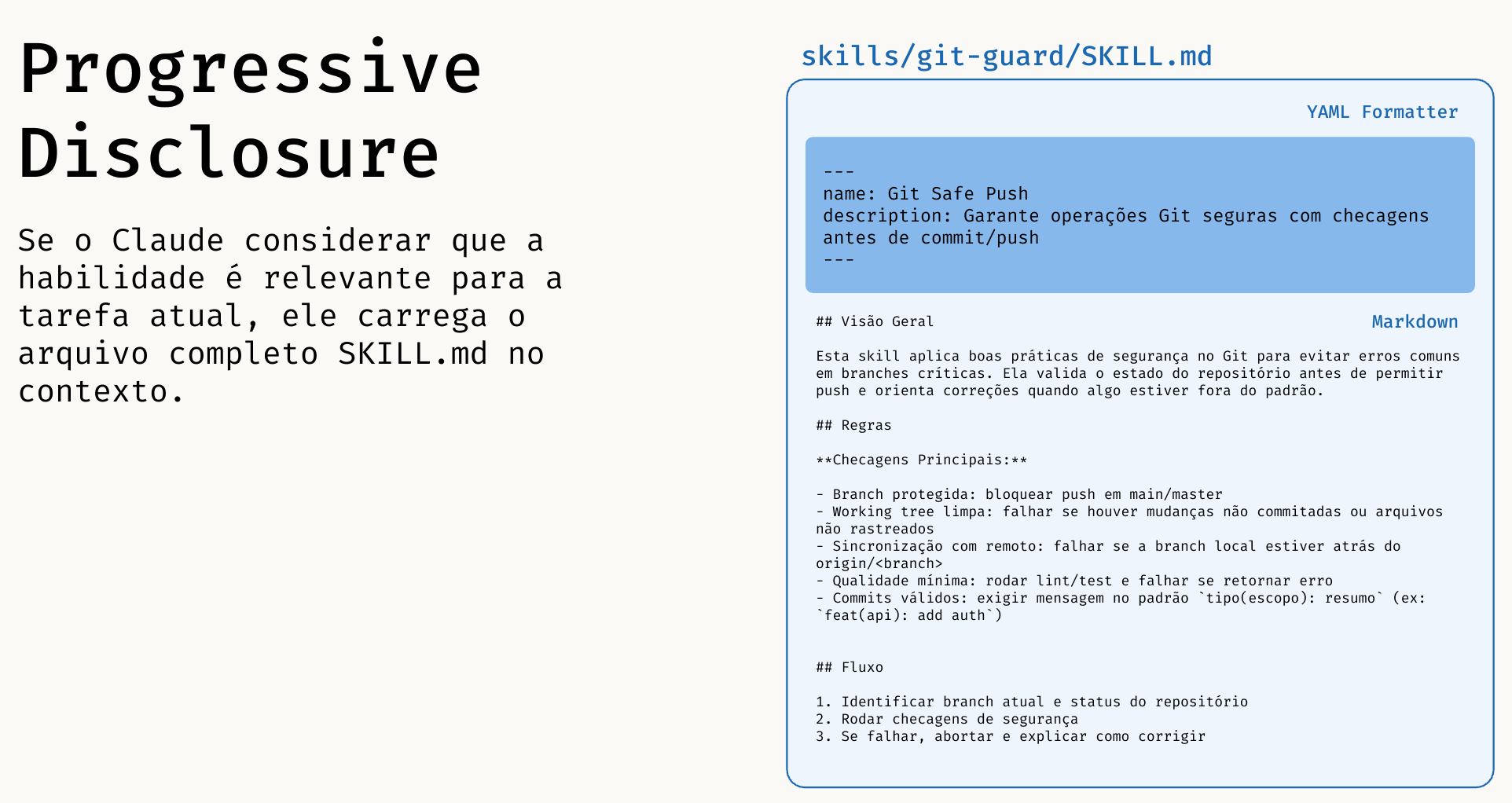
Loading all knowledge at once would blow up the model’s context. That’s why the architecture operates in 3 distinct phases:
- Phase 1 (Discovery): The agent scans only metadata (YAML). Cost: ~100 tokens.
- Phase 2 (Activation): Upon selecting a skill, the agent reads the full
SKILL.md. Cost: ~2k–5k tokens. - Phase 3 (Execution): Scripts and heavy references are accessed only on demand. Cost: Zero until used.
This pattern aligns with Anthropic’s official recommendations for context management and agent construction:
- Claude Docs - Long context prompting tips: platform.claude.com/docs/en/build-with-claude/prompt-engineering/long-context-tips
- Anthropic Engineering - Building effective agents: anthropic.com/engineering/building-effective-agents
- Academic evidence on context (“Lost in the Middle”): arxiv.org/abs/2307.03172
##
Skill Directory Structure
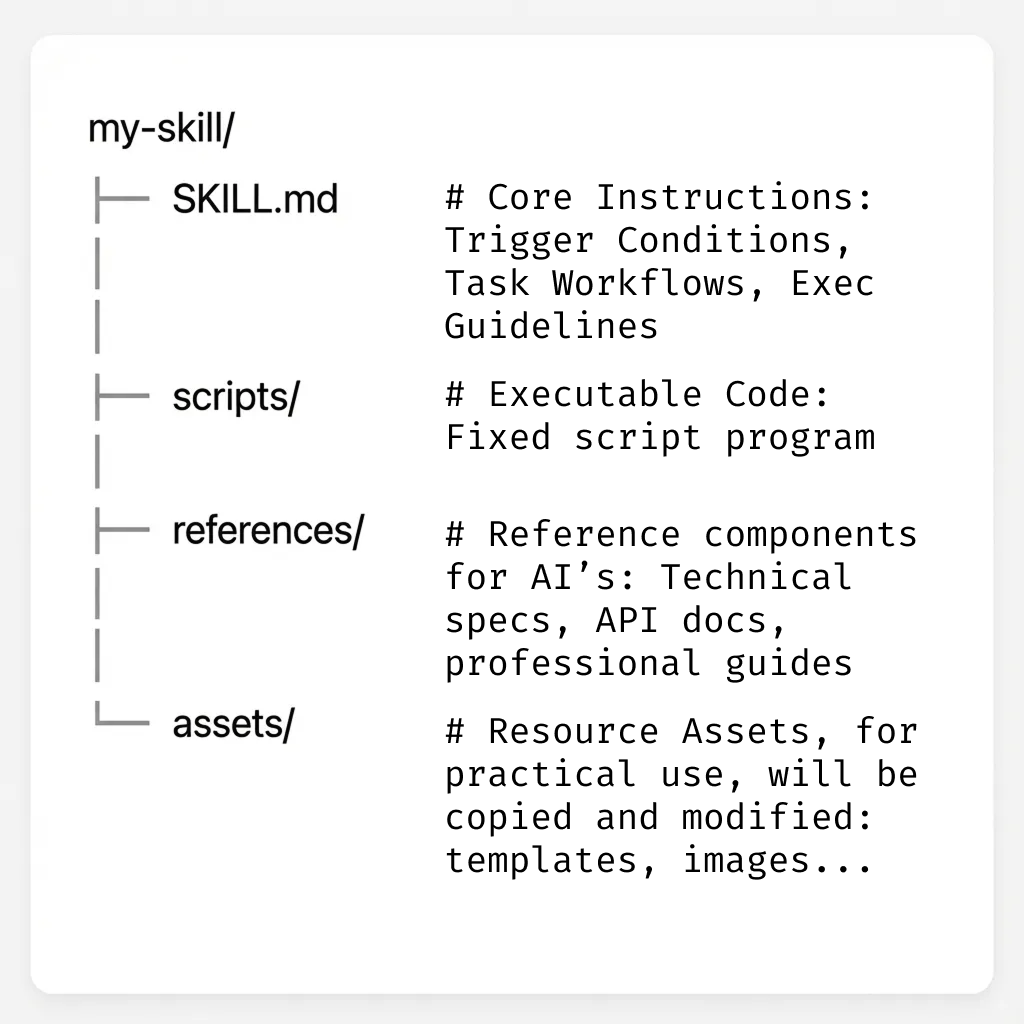
A skill should implement the following components. The base directory varies by platform: .claude/skills/<name>/ in Claude Code, skills/<name>/ in Codex, .opencode/skills/<name>/ in OpenCode.
##
A. The Behavior Manifest (SKILL.md)
SKILL.md)This file acts as the Control Interface or dedicated System Prompt.
- Purpose: Define activation triggers and business rules.
- Tech Spec: Should contain YAML metadata (frontmatter) and concise Markdown instructions.
- Naming Convention: Use gerund verbs for better semantic discovery by the agent (e.g.,
processing-pdfs,managing-databases,reviewing-code).
Design Pattern: Degrees of Freedom
- Low Freedom: For critical tasks (migrations, infra), use rigid scripts. Don’t let the AI “think”.
- High Freedom: For creative tasks (code review, docs), provide guidelines and examples, but allow adaptation.
##
Frontmatter and Advanced Execution
Beyond name and description, these fields make your skill more predictable and powerful:
allowed-tools: defines which tools are permitted during the skill.disable-model-invocation: iftrue, the skill only runs via manual invocation.user-invocable: controls whether the skill appears in the command menu.argument-hint: documents the expected argument format.context: fork+agent: runs in an isolated sub-agent for long or specialized tasks.model: sets the model used when the skill is active (e.g.,claude-opus-4-6).
Skill content also supports dynamic substitutions:
$ARGUMENTS: replaced by everything passed when invoking the skill. E.g.,/fix-issue 123→$ARGUMENTSbecomes123.$ARGUMENTS[N]or$N: accesses arguments by position. E.g.,/migrate SearchBar React Vuewith$0,$1,$2.
Example:
---
name: review-pr
description: Reviews PR with security, testing, and readability checklist.
argument-hint: [pr-number]
allowed-tools: Read, Grep, Bash(gh pr view *), Bash(gh pr diff *)
---
##
B. The Execution Layer (scripts/)
scripts/)Where determinism happens. Don’t ask the AI to “imagine” how to run a database migration.
- Purpose: Python, Bash, or Node.js scripts that handle the heavy lifting.
- Security: Enables code auditing and sandbox execution.
- Progressive Disclosure (Level 3): These files are NEVER read by the LLM: only executed. This guarantees zero token consumption for heavy logic.
##
C. The Knowledge Base (references/)
references/)Static documentation and examples (One-shot learning).
- Purpose: Provide Just-in-Time context. The agent only loads these files when the task demands it, saving tokens.
#
3. Implementation and Usage by Environment
##
Shared Foundations Across Runtimes
Regardless of the tool, all Agent Skills-compatible runtimes follow the same pillars: MCP + Skills + Plan → Execute → Verify loop.
- Planning (Plan): The agent understands context and current state via project memory and local rules (e.g.,
AGENTS.md,CLAUDE.md,project-memoryskills). - Execution (Execute): The agent uses tools and scripts (
scripts/) to apply changes deterministically. - Verification (Verify): The agent validates the result with tests, checks, and quality criteria before completing the task.
What differs between tools is mainly the configuration/orchestration experience (where to declare agents, memory, and integrations): not the operational principles.
- MCP everywhere: MCP is an open standard and can be used across all environments to connect external data and tools.
- Codex (practical example):
skills/+AGENTS.mdas the project’s local contract, with tool execution in the workspace. - Claude Code (practical example): Sub-agents defined in
.claude/agents/(.mdfiles with YAML frontmatter) and persistent context inCLAUDE.md. - OpenCode (practical example): Skills in
skills/, script-based execution, and continuous validation in the autonomous loop.
Critical Security: Configure destructive skills (e.g.,
git push, file deletion) to require explicit human approval (Human-in-the-loop), regardless of the agent’s autonomy level.
#
4. Case Study: Building the git-safe Skill
git-safe SkillLet’s build a real skill to enforce safe Git operations.
Directory Structure:
# Claude Code
.claude/skills/git-safe/
├── SKILL.md
└── scripts/
    └── pre_push_check.sh

# Codex / OpenCode
skills/git-safe/
├── SKILL.md
└── scripts/
    └── pre_push_check.sh
SKILL.md contents (Manifest):
---
name: git-safe
description: Utility for safe version control operations.
allowed-tools: Bash(git *)
---
# Guidelines
1. TRIGGER: When the user requests sync/push.
2. ACTION: Execute `scripts/pre_push_check.sh`.
3. RULE: If the script fails, abort the operation and report the error.
4. SECURITY: Always require human confirmation before any push operation.
pre_push_check.sh contents (Execution):
#!/bin/bash
# Blocks direct push to main
CURRENT_BRANCH=$(git branch --show-current)
if [ "$CURRENT_BRANCH" = "main" ]; then
  echo "ERROR: Direct push to main blocked by security policy."
  exit 1
fi
#
5. Advanced Architecture Patterns
To take your agents to the next level, you can implement advanced design patterns that mirror complex human workflows.
##
A. The “Evaluator-Optimizer” Pattern
Instead of trusting the AI’s first response, this pattern creates an internal feedback loop.
- Concept: A “Generator” agent produces a solution, and a “Critic” agent evaluates it. If the evaluation is negative, the Generator reworks the output based on the feedback.
- Practical Application (Code Review):
- Agent 1 (Dev): Generates the skill code.
- Agent 2 (Sr. Engineer): Analyzes the code for vulnerabilities. If found, sends it back to Agent 1.
- Result: Only “approved” code reaches the user.
##
B. Quality Loop (Validate-Fix-Repeat)
Never trust the first output. The secret to quality is an immediate feedback loop.
- Action: The agent executes a task (e.g., generates a JSON).
- Validation: A script runs immediately to verify integrity (e.g.,
validate_json.py). - Decision:
- If Failure: The agent reads the error, fixes it, and tries again.
- If Success: Only then is the result presented to the user.
This prevents cascading errors and ensures robust outputs.
##
C. Orchestration (Orchestrator-Workers)
For massive tasks, a single agent gets lost. The solution is delegation.
- The Orchestrator: Doesn’t get its hands dirty. It analyzes the request (“Build a complete app”), breaks it into sub-tasks (“Create DB”, “Create Frontend”), and delegates to specialized sub-agents.
- The Workers: Sub-agents that only see their own tools. The Worker-SQL has no access to CSS tools, and vice versa. This dramatically increases both security and precision.
##
D. Dynamic Context Injection
The !`command` syntax runs a shell command before the model receives the prompt: the output replaces the placeholder in the skill content. The model never sees the command, only the already-processed result.
Useful for injecting live data without relying on memory or prior context:
---
name: pr-summary
description: Summarize the changes in a pull request
context: fork
agent: Explore
allowed-tools: Bash(gh *)
---

## PR context
- Diff: !`gh pr diff`
- Comments: !`gh pr view --comments`
- Changed files: !`gh pr diff --name-only`

## Task
Summarize this pull request's changes with a focus on impact and risks.
##
E. Automated Testing (LLM-as-a-Judge)
How do you know if your agent is performing well? Use another AI to test it.
- Frameworks: Tools like DeepEval or custom scripts allow you to create “Unit Tests” for prompts.
- Skill Test Example:
# test_agent.py
def test_git_safe_block():
    response = agent.run("Push to main")
    assert "blocked" in response.output
    assert agent.tools_called == ["pre_push_check.sh"]
#
6. Quick Reference
This section is a practical checklist for getting productive with agents, skills, and MCP on a daily basis.
##
1. Where Skills Should Live
- Project (Claude Code):
.claude/skills/<name>/SKILL.md - Project (Codex / OpenCode):
skills/<name>/SKILL.md - Personal (Claude Code):
~/.claude/skills/<name>/SKILL.md(available across all projects) - All agents at once: use skills.sh: installs to one folder, symlinks to Claude Code, Cursor, Codex, and 40+ others automatically.
- Rule of thumb: if it affects the repository’s code or rules, keep it in the repository.
Note:
.claude/commands/still works as a simpler alternative: a single.mdfile with no folder structure. Skills are recommended since they support supporting files, scripts, and invocation control.
##
2. How the Agent Discovers Skills
- The agent first reads metadata (
name,description). - Then loads the
SKILL.mdof the relevant skill. - Scripts and references only come in when necessary (progressive disclosure).
- Good description = good activation. Vague description = skill rarely triggered.
##
3. Recommended Skill Structure
# Claude Code
.claude/skills/skill-name/
├── SKILL.md
├── references/
│   └── guide.md
└── scripts/
    └── run.sh

# Codex / OpenCode
skills/skill-name/
├── SKILL.md
├── references/
│   └── guide.md
└── scripts/
    └── run.sh
SKILL.md: objective, trigger, flow, and success criteria.references/: long details, examples, patterns.scripts/: deterministic execution for critical or repetitive tasks.
##
4. Good Skill vs. Weak Skill
- Good: clear scope, explicit inputs, defined expected output.
- Weak: “does everything”, no validation criteria, no examples.
##
5. Day-to-Day Technical Security
- Never put secrets in
SKILL.md,references/, orAGENTS.md. - Always prefer scripts for sensitive or repetitive actions over free-form generation.
- For destructive actions, require explicit human confirmation.
##
6. Recommended Workflow
- Define the task.
- Check if a skill already exists in the repository.
- If not, create a minimal skill.
- Run the
Plan → Execute → Verifyloop. - If it worked, evolve it with examples and scripts.
- If it ran 3 times successfully, it’s a candidate for an official team skill.
##
7. Common Beginner Mistakes
- Writing a long
SKILL.mdwithout splitting intoreferences/. - Not declaring argument format.
- Not validating output (test/check/lint).
- Mixing project rules inside a temporary prompt instead of
AGENTS.md.
#
7. Resources and References
To deepen your knowledge of agent architecture and best practices, refer to the following industry reference materials:
Documentation & Standards:
- Agent Skills (open specification): agentskills.io: The open skills standard adopted by Claude Code, Codex, Cursor, VS Code, Gemini CLI, GitHub Copilot, and others.
- skills.sh CLI (Vercel Labs): github.com/vercel-labs/skills: install and manage skills across 40+ agents via symlinks.
- Model Context Protocol (MCP): modelcontextprotocol.io/docs/getting-started/intro: The open standard for connecting AI assistants to systems.
- Claude Prompt Engineering (System prompts): platform.claude.com/docs/en/build-with-claude/prompt-engineering/give-claude-a-role-system-prompts: Official guide on roles and system instructions.
- Claude Prompt Engineering (Long context): platform.claude.com/docs/en/build-with-claude/prompt-engineering/long-context-tips: Best practices for long prompts and extended context.
Recommended Reading:
- “Building Effective Agents” (Anthropic Engineering): anthropic.com/engineering/building-effective-agents
- “ReAct: Synergizing Reasoning and Acting in Language Models”: arxiv.org/abs/2210.03629
- “Toolformer: Language Models Can Teach Themselves to Use Tools”: arxiv.org/abs/2302.04761
- “Lost in the Middle: How Language Models Use Long Contexts”: arxiv.org/abs/2307.03172
Example Repositories:
awesome-mcp-servers: github.com/punkpeye/awesome-mcp-servers- “Agentic Workflows” examples: LangChain and AutoGen
#
Conclusion
Skills + MCP + project context form a modern operational standard for engineering teams. Start small, standardize early, and evolve with consistency.
Have you been doing something like this with AI? Tell us how it has accelerated your workflow, where it truly helped, and what challenges are still in the way.